1. Type “Regedit”
2. Goto HKEY_CURRENT_USER >> Software >> Microsoft >> Windows >> CurrentVersion.
3. Click on Internet Settings so you can view its contents.
4.Check Regedit’s right-hand column for the following two lines (values): “MaxConnectionsPerServer” and “MaxConnectionsPer1_0Server”
If these values are present. If not present follow the instructions in bracket.
{{If These values r not present right click on the white region of Regedit’s right-hand column, click “New”, and then click “DWORD Value”.
Enter MaxConnectionsPerServer for the name of the new “DWORD Value” and press Enter. The new value should now appear in Regedit’s right-hand column.
Right-click the new value and click “Modify”.}}
right-click on the first value (MaxConnectionsPerServer),
5. select “Modify” from the drop-down menu, click “Decimal”, and set the Value data field to 6.
6. Close all running I.E. windows and Voila!! test to see your increased speed.
Showing posts with label Tips n Tricks. Show all posts
Showing posts with label Tips n Tricks. Show all posts
Monday, December 31, 2007

Tuesday, November 13, 2007
Interesting Registry Tweaks
1. Change the name of Recycle Bin
Change the name of recycle bin......
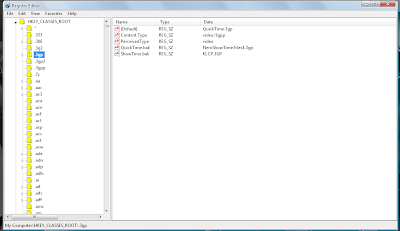
To change the name of the Recycle Bin desktop icon, click Start then goto Run, write Regedit and press Enter. It opens Registry Editor. Now in Registry Editor go to:
HKEY_CLASSES_ROOT/CLSID/{645FF040-5081-1
01B-9F08-00AA002F954E}
and change the name "Recycle Bin" to whatever you want
Note : (don't type any quotes).
2.Speed up your Start Menu
Speed up your Start Menu
Hey.. Speed up ur Start Menu...
As...The default setting of Windows causes a slight delay when opening the sub categories of the start menu.....
That is why we need to hover the mouse on it for about half a second.....
You can change this default setting by following these steps.....
1. Go to start==> run==> Type regedit. Press enter.....
2. Navigate to "HKEY_CURRENT_USER----> Control Panel."
3. Click on Desktop.
4. On the right pane look out for 'MenuShowDelay'....(If you can't find it right-click and create a new 'Multi-String Value' and rename it as 'MenuShowDelay')
5. The default setting is 400....
6. Double click it to modify it....
7. Set it to 0 and there will be no delay...
8. Exit registry and reboot.
However making it zero makes it difficult to move the mouse without accidentally opening other folders. So try giving some lower values and choose the one which best suits you. ..
3.Internet Explorer As Fast As FireFox
Internet Explorer As Fast As FireFox
Open registry editor by going to Start >> Run and entering regedit.
Once in registry,
navigateto key HKEY_CURRENT_USER\Software\microsoft\Windows\ Current
Version \InternetSettings.
Right click on the right windows > New > DWORD.
Type
MaxConnectionsPerServer > You can set value (the more higher the no, the more
good speed eg:99). Create another DWORD >type MaxConnectionsPer1_0Server.
Then put a high value as mentioned above.
Restart I.E and you are done.
4.Automatically close the non-responding pgm - Windows XP
Automatically close the non-responding pgm - Windows XP
With a small registry tweak, Windows XP can be set to automatically close any program that 'stops responding' (crashes), eliminating the need for you to use the task manager to close down the offending software manually.
Steps:
Open REGEDIT and navigate to HKEY_CURRENT_USER\Control Panel\ Desktop
Modify the REG_SZ entry AutoEndTasks with a value of 1
Note:
Without having much knowledge in Registry Editor Dont try. Before editing registry take a back up.
Back Up Registry:
Start --> Run
Regedit
File --> Export
And export the registry to the safe place.
5.Block USB in Windows Xp
1. Start -> Run -> regedit ->Find the Hkey_Local_Machine>System>Current Control set>Services>USBStor.
Look at the right pain and find out the Start where value of the start would be 0000000(3) edit the value by double mouse click and type 4 and save.
2. Restart ur pc.
6.Change Title of Internet Explorer
Customize ur Internet Explorer
1. Open Registry Editor
2. Move to the following key.
3. HKEY_CURRENT_USER\Software\Microsoft\Internet. Explorer\Main.
4. In the Right Panel look for the string "Window Title" and change its value as u wish. If the String value is not there create a New String value and assign the value as your wish.
7.Chnage the Thumbnail Size in Windows XP:
1. Open Registry Editor.
2. Navigate to the following Registry Value.
For Current User: HKEY_CURRENT_USER
For All Users : HKEY_LOCAL_MACHINE--> Software – Microsoft – Windows – CurrentVersion – Explorer
3. Add/Modify the following entry.ThumbnailSize - Double Word - Value: 32 - 256ThumbnailQuality - Double Word - Value: 50 -100
4. Reboot the PC to take effect.
Note:
Editing the Registry will cause the System unstable. Please take a Proper Back-Up before editing with Registries. The Blog nor the Author will not be responsible for any liabilities.
Change the name of recycle bin......
To change the name of the Recycle Bin desktop icon, click Start then goto Run, write Regedit and press Enter. It opens Registry Editor. Now in Registry Editor go to:
HKEY_CLASSES_ROOT/CLSID/{645FF040-5081-1
01B-9F08-00AA002F954E}
and change the name "Recycle Bin" to whatever you want
Note : (don't type any quotes).
2.Speed up your Start Menu
Speed up your Start Menu
Hey.. Speed up ur Start Menu...
As...The default setting of Windows causes a slight delay when opening the sub categories of the start menu.....
That is why we need to hover the mouse on it for about half a second.....
You can change this default setting by following these steps.....
1. Go to start==> run==> Type regedit. Press enter.....
2. Navigate to "HKEY_CURRENT_USER----> Control Panel."
3. Click on Desktop.
4. On the right pane look out for 'MenuShowDelay'....(If you can't find it right-click and create a new 'Multi-String Value' and rename it as 'MenuShowDelay')
5. The default setting is 400....
6. Double click it to modify it....
7. Set it to 0 and there will be no delay...
8. Exit registry and reboot.
However making it zero makes it difficult to move the mouse without accidentally opening other folders. So try giving some lower values and choose the one which best suits you. ..
3.Internet Explorer As Fast As FireFox
Internet Explorer As Fast As FireFox
Open registry editor by going to Start >> Run and entering regedit.
Once in registry,
navigateto key HKEY_CURRENT_USER\Software\microsoft\Windows\ Current
Version \InternetSettings.
Right click on the right windows > New > DWORD.
Type
MaxConnectionsPerServer > You can set value (the more higher the no, the more
good speed eg:99). Create another DWORD >type MaxConnectionsPer1_0Server.
Then put a high value as mentioned above.
Restart I.E and you are done.
4.Automatically close the non-responding pgm - Windows XP
Automatically close the non-responding pgm - Windows XP
With a small registry tweak, Windows XP can be set to automatically close any program that 'stops responding' (crashes), eliminating the need for you to use the task manager to close down the offending software manually.
Steps:
Open REGEDIT and navigate to HKEY_CURRENT_USER\Control Panel\ Desktop
Modify the REG_SZ entry AutoEndTasks with a value of 1
Note:
Without having much knowledge in Registry Editor Dont try. Before editing registry take a back up.
Back Up Registry:
Start --> Run
Regedit
File --> Export
And export the registry to the safe place.
5.Block USB in Windows Xp
1. Start -> Run -> regedit ->Find the Hkey_Local_Machine>System>Current Control set>Services>USBStor.
Look at the right pain and find out the Start where value of the start would be 0000000(3) edit the value by double mouse click and type 4 and save.
2. Restart ur pc.
6.Change Title of Internet Explorer
Customize ur Internet Explorer
1. Open Registry Editor
2. Move to the following key.
3. HKEY_CURRENT_USER\Software\Microsoft\Internet. Explorer\Main.
4. In the Right Panel look for the string "Window Title" and change its value as u wish. If the String value is not there create a New String value and assign the value as your wish.
7.Chnage the Thumbnail Size in Windows XP:
1. Open Registry Editor.
2. Navigate to the following Registry Value.
For Current User: HKEY_CURRENT_USER
For All Users : HKEY_LOCAL_MACHINE--> Software – Microsoft – Windows – CurrentVersion – Explorer
3. Add/Modify the following entry.ThumbnailSize - Double Word - Value: 32 - 256ThumbnailQuality - Double Word - Value: 50 -100
4. Reboot the PC to take effect.
Note:
Editing the Registry will cause the System unstable. Please take a Proper Back-Up before editing with Registries. The Blog nor the Author will not be responsible for any liabilities.
Sunday, November 11, 2007
Windows Vista Tip: 12 Hidden Windows Explorer Tricks
Address Bar:-
If you are not used to viewing the path as Breadcrumb Trails and want to view the full path (Windows XP style), left click anywhere to the right of the path in the Address bar which will display XP style full path. To return to Breadcrumb Trails view, press the Esc key. (Clicking where circle is shown in Address Bar, will display XP style full path).

- To quickly create a shortcut to the location you are viewing, right click anywhere to the right of the path in the Address Bar and select Copy Address. This will put the text of the path in the clipboard allowing you to switch to your Desktop (for example) and right click and Paste Shortcut. Since the path is stored in the clipboard, it can also be pasted in a document, email, and so on…

- If you are in a deeply nested folder where the Address Bar does not have room to show the entire path, click on the double arrows to the left of the first item (in Address Bar). Clicking this will show the parent folders that don't fit on the Address Bar.

- Another feature found, to the right of the Back and Forward buttons (just before the Address Bar) is the Recent Items drop down button. Items displayed in this list are recently visited locations that you can select and jump to the location with needing to navigate using Explorer.

- Clicking anywhere on the Address bar and typing a URL such as http://www.gizmos4fun.blogspot.com will launch your web browser and open the site you typed.
Details Pane
- To enable, select Organize (on Command Bar) / Layout / Details Pane. When a document , spreadsheet, etc.. is highlighted, certain Category properties in the bottom details pane can be modified to add tags, subject, titles, etc.. by mousing over the field (which displays the box) next to the Category. When finished, click the Save bttom to the right of the Details pane.
Wait for the PART II of this post..
SOURCE:watchingthenet
Wednesday, November 7, 2007
Get song lyrics while playing a song !!!
Here's a very cool little plugin called Lyrics Plugin for Winamp or Windows Media Player that displays song lyrics when you start playing a song ! You no longer have to go searching the internet for the song lyrics ! Simply play your MP3 file and a few magical seconds later all of the lyrics for that song show up automatically !!!
THE BEST PART OF THIS IS IT SHOWS ANY LANGUAGE !! HERE's My Screen Short
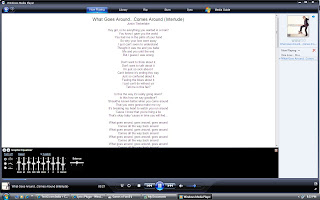
Once installed, for example in Windows Media Player on my computer, choose a song from the libray and begin playing it. Then click on the Now Playing button across the top and the lyrics screen will show up. Of course, this program will not find all of the lyrics for every song, but if you feel up to you can add the lyrics yourself! But from my testing, any popular song or half-decent band's songs were all found and they were correct.
Download Here for
THE BEST PART OF THIS IS IT SHOWS ANY LANGUAGE !! HERE's My Screen Short
Once installed, for example in Windows Media Player on my computer, choose a song from the libray and begin playing it. Then click on the Now Playing button across the top and the lyrics screen will show up. Of course, this program will not find all of the lyrics for every song, but if you feel up to you can add the lyrics yourself! But from my testing, any popular song or half-decent band's songs were all found and they were correct.
Download Here for
How to enable DreamScene Video Wallpapers in ALL Windows Vista Versions

DreamScene is a feature that enables users of Windows Ultimate editions to set up animated backgrounds instead of the mundane static wallpapers. But Microsoft has limited the availability of this feature only to the Ultimate edition of Vista. While a workaround for enabling the actual DreamScene feature in the other version of Vista is not yet available, users can employ an alternative with similar results.
The fact of the matter is that this method will not get DreamScene working on your machine, but the effect will be similar to that delivered by the original. It may require some amount of effort on your behalf, but go along with me on this one. It will be worth it.
First off, you will need the latest edition of VLC Player[Freeware]. After downloading and installing VLC Player make your way to Settings > Preferences > Video > Output Modules > DirectX In order to see all the settings available, you will have to check the Advanced options box in the bottom right corner. Enable Wallpaper Mode is such an advanced option; it is disabled by default, but you can just enable it by checking the box next to it.
Now it's time to simulate the behavior of DreamScene. In this sense, navigate to Settings > Preferences > Interface > Main Interfaces > wxWidgets and simply uncheck the box next to the Taskbar option. This will remove VLC Player from the Windows Taskbar while the application is running, and it will be running extensively. And if you select Settings > Preferences you will also be able to loop a single video fragment.
Tuesday, October 30, 2007
How to pick a geniune Password

When it comes to security, Bruce Schneier is a god among us mere mortals. He has written some of the most influential books on computer security and cryptography ever printed, and his blog is essential reading for anyone on the Internet.
So when Bruce says here's how to create a secure password (and how he creates his own passwords), I listen. His post on the topic is extensive, so I'll try to boil it down to the essentials. If you have the time, I encourage you to read the whole thing, though.
First question: How are passwords cracked, anyway? Primarily through brute force "dictionary" attacks, where software tries to guess a password by running through a series of common phrases or words in various combinations. Sure, we know that "password" and "qwerty" are easy to crack, but password crackers have gotten much more sophisticated these days. Now, they check hundreds of these common "root" passwords (here's a list)... in combination with various "appendages," including all two- and three-digit combinations, single symbols (like ! and ?), dates from 1900 on, and a few others.
The crackers also sub in common characters like "3" for "E" and other typical hacker-speak substitutions.
What's that mean? Basically, if you thought the safe-looking pigl3t9! was a secure password, you're sadly mistaken. Any modern password cracker will suss it out in a matter of minutes.
Before you begin to despair, Schneier offers simple rules on how to create a password that cannot be easily cracked by such methods. (Mind you, given enough time, any password can be cracked, though. But this will make it much harder.)
The trick is to use a "root" that is not in that list that I linked above, and to put your "appendage" (or two of them) in an unusual place: Either in the middle of the root or at both the beginning and the end.
So when Bruce says here's how to create a secure password (and how he creates his own passwords), I listen. His post on the topic is extensive, so I'll try to boil it down to the essentials. If you have the time, I encourage you to read the whole thing, though.
First question: How are passwords cracked, anyway? Primarily through brute force "dictionary" attacks, where software tries to guess a password by running through a series of common phrases or words in various combinations. Sure, we know that "password" and "qwerty" are easy to crack, but password crackers have gotten much more sophisticated these days. Now, they check hundreds of these common "root" passwords (here's a list)... in combination with various "appendages," including all two- and three-digit combinations, single symbols (like ! and ?), dates from 1900 on, and a few others.
The crackers also sub in common characters like "3" for "E" and other typical hacker-speak substitutions.
What's that mean? Basically, if you thought the safe-looking pigl3t9! was a secure password, you're sadly mistaken. Any modern password cracker will suss it out in a matter of minutes.
Before you begin to despair, Schneier offers simple rules on how to create a password that cannot be easily cracked by such methods. (Mind you, given enough time, any password can be cracked, though. But this will make it much harder.)
The trick is to use a "root" that is not in that list that I linked above, and to put your "appendage" (or two of them) in an unusual place: Either in the middle of the root or at both the beginning and the end.
Monday, October 29, 2007
Clear IE-7 using Command Line
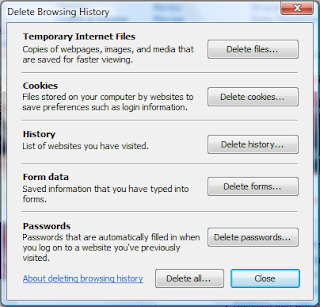
If you like to build batch files to automate cleanup on your computer, you'll probably want to include at least one of these commands in your batch script. You can automate any one of the functions on the Internet Explorer 7 Delete Browsing History dialog.
Here's the dialog that you are probably used to seeing:
Here's the dialog that you are probably used to seeing:

And here's the commands that correspond to the different buttons. The most important one from a cleanup perspective is the first, which will delete just the temporary internet files that are cluttering up your computer.
To use these commands, just run them from the command line, the start menu search box in vista, or a batch file.
Temporary Internet Files
RunDll32.exe InetCpl.cpl,ClearMyTracksByProcess 8
Cookies
RunDll32.exe InetCpl.cpl,ClearMyTracksByProcess 2
History
RunDll32.exe InetCpl.cpl,ClearMyTracksByProcess 1
Form Data
RunDll32.exe InetCpl.cpl,ClearMyTracksByProcess 16
Passwords
RunDll32.exe InetCpl.cpl,ClearMyTracksByProcess 32
Delete All
RunDll32.exe InetCpl.cpl,ClearMyTracksByProcess 255
Delete All - "Also delete files and settings stored by add-ons"
RunDll32.exe InetCpl.cpl,ClearMyTracksByProcess 4351
Sunday, October 21, 2007
µTorrent, the BitTorrent client that is.
Micro-Sized Yet Feature Filled
Most of the features present in other BitTorrent clients are present in µTorrent, including bandwidth prioritization, scheduling, RSS auto-downloading and Mainline DHT (compatible with BitComet). Additionally, µTorrent supports the Protocol Encryption joint specification (compatible with Azureus 2.4.0.0 and above, BitComet 0.63 and above) and peer exchange.
Resource-Friendly
µTorrent was written with efficiency in mind. Unlike many torrent clients, it does not hog valuable system resources - typically using less than 6MB of memory, allowing you to use the computer as if it weren't there at all. Additionally, the program itself is contained within a single executable less than 170 KB in size.Skinnable and Localized
Various icon, toolbar graphic and status icon replacements are available, and creating your own is very simple. µTorrent also has support for localization, and with a language file present, will automatically switch to your system language. If your language isn't available, you can easily add your own, or edit other existing translations to improve them!
Actively Developed and Improved
The developer puts in a lot of time working on features and making things more user-friendly. Releases only come out when they're ready, with no schedule pressures, so the few bugs that appear are quickly addressed and fixed.
Download µTorrent now - It's Free.For Wine, Windows 95 (Winsock2), 98/ME, NT/2000, XP, 2003, and Vista (1.7 only).
Get µTorrent 1.6.1 Standalone (170 kB)Language pack
Get µTorrent 1.7 Release Candidate 6 (214 kB)Language pack
Get µTorrent 1.6.1 Installation Program (681 kB)
Most of the features present in other BitTorrent clients are present in µTorrent, including bandwidth prioritization, scheduling, RSS auto-downloading and Mainline DHT (compatible with BitComet). Additionally, µTorrent supports the Protocol Encryption joint specification (compatible with Azureus 2.4.0.0 and above, BitComet 0.63 and above) and peer exchange.
Resource-Friendly
µTorrent was written with efficiency in mind. Unlike many torrent clients, it does not hog valuable system resources - typically using less than 6MB of memory, allowing you to use the computer as if it weren't there at all. Additionally, the program itself is contained within a single executable less than 170 KB in size.Skinnable and Localized
Various icon, toolbar graphic and status icon replacements are available, and creating your own is very simple. µTorrent also has support for localization, and with a language file present, will automatically switch to your system language. If your language isn't available, you can easily add your own, or edit other existing translations to improve them!
Actively Developed and Improved
The developer puts in a lot of time working on features and making things more user-friendly. Releases only come out when they're ready, with no schedule pressures, so the few bugs that appear are quickly addressed and fixed.
Download µTorrent now - It's Free.For Wine, Windows 95 (Winsock2), 98/ME, NT/2000, XP, 2003, and Vista (1.7 only).
Get µTorrent 1.6.1 Standalone (170 kB)Language pack
Get µTorrent 1.7 Release Candidate 6 (214 kB)Language pack
Get µTorrent 1.6.1 Installation Program (681 kB)
Wednesday, October 17, 2007
Create Wallpaper using Paint...
Create a wallpaper using PAINT!!!!
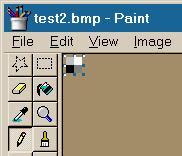
Open your Paint program
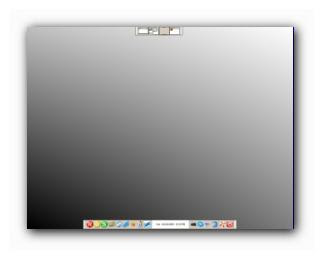
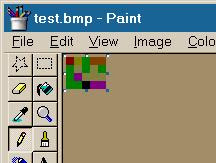
Select Image->Attributes and make your image 2 pixels by 2 pixels.Select View->Zoom->Custom->800%Now put black in the lower-left corner, dark gray in the lower-right corner, and light grey in the upper-left.Like so...
Save it somewhere convenient, then in your display properties, select the bitmap you just made, select 'Center' and Stretch Desktop Wallpaper enabled.Lovely isn't it?
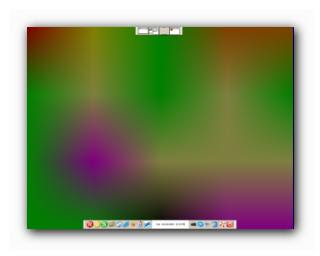
This works with all kinds of bitmaps, look at this one...
and what it does...
Thanx for reading my post.. Still some more to come frm my side...
Sunday, October 14, 2007
Making Use of ctrl+tab in IE-7
Hi every body, this is my first post towards Tips n Tricks segment. Hope u will enjoy this..
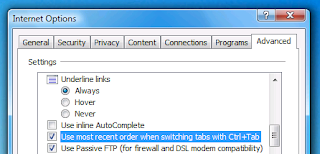
Check the box for "Use most recent order when switching tabs with Ctrl+Tab". You'll need to restart IE7 for this change to take effect.
If you have a lot of tabs open at a time, it's sometimes quicker to have Ctrl+Tab switch to the most recent tab instead of the next one to the right . This is the default setting in the Tab Mix Plus extension for Firefox, so a lot of you are probably used to it .
To make IE use this behavior, go to Tools \ Internet Options. Click on the Advanced tab.
Check the box for "Use most recent order when switching tabs with Ctrl+Tab". You'll need to restart IE7 for this change to take effect.
Subscribe to:
Comments (Atom)


