Welcome to Gizmos4Fun. Your Guide To the Future Technology

Showing posts with label Tech Specs. Show all posts

Tuesday, January 22, 2008

Re-Open Closed Tabs In Internet Explorer

If there's one thing that annoys me in Internet Explorer more than anything else, it's that there is no way to re-open a tab once you've closed it. It's especially annoying when you've done a lot of browsing so you have to sift through your history to find the link for the page you closed.

Thankfully there's an add-on for IE7 called "IE7 Open Last Closed Tab" which will remember what tabs you've recently closed so that you can quickly re-open them.

After installation, you'll notice that there's nothing different in the UI whatsoever… but there are two new shortcut keys.

  • Alt+X will restore the last closed tab.
  • Alt+Q will bring up a screen to let you visually choose from the recently closed tabs.
Note:

You'll notice there's an Amazon ad at the bottom… you can turn that off by clicking the "Disable Product Bar" button on the toolbar, and then you'll get this message:


I'm not entirely sure why they chose Amazon ads to integrate… but either way you can get rid of them. If you really like the software you can always donate some money their way.

Download IE7 Open Last Closed Tab from windowsmarketplace.com

LG's Watch Phone


It's only a concept for now, but LG's phone-in-a-wristwatch prototype was drawing big crowds at CES on Monday.

Specifications were scarce for the watch phone; indeed, LG reps wouldn't even take it out of its glass case, and from what I understand, the watch on display can't even make calls (although building a GSM or CDMA radio into the wristwatch wouldn't be a problem, I'm told). The cool display isn't a touch screen; instead, a jog dial on the side of the casing lets you scan through the various menus. Bluetooth and SMS messaging would potentially be part of the package, along with voice commands for barking orders, Dick Tracy-style.

Cool concept, right? Although after pondering the reality of a watch phone for a bit, I'm not sure I'd want one; you'd pretty much need a Bluetooth headset for every call, unless you're fine with everyone in earshot hearing both ends of your conversations (assuming the watch has an external speaker, of course, which doesn't seem likely). Still, you can dream.

That said, the LG watch phone looks more like a really cool idea than a shipping product; indeed, the LG reps on hand wouldn't even speculate on pricing or a release date.

Thursday, January 17, 2008

SABSEBOLO.com Free conferencing Site!

Hotmail co-founder Sabeer Bhatia has launched SabseBolo.com, a free conferencing facility, a few months after launching Live Documents, an online office application.


"Through SabseBolo.com, we are targeting small and medium enterprises and entrepreneurs. But anyone can use this facility. It is absolutely free," Bhatia said.
People can visit the website and register themselves. Once registered they would get a conference ID and PIN, which could be shared for conferencing.


Revenue would be generated through commercials. "Before the conference begins there would be a five-second commercial. We have not decided the tariff as yet. It could be as low as Re 1 per 5-second commercial," Bhatia said.


The idea to set up a free conferencing facility came to Bhatia when he had to make a conference call to his offices in Mumbai, Bangalore and Delhi. "The existing facilities are too costly. With Sabsebolo.Com, conferencing is free now,"
G4F Verdict : " Its indeed a welcome sign, as Entrepreneurs would get the most of it.. Thus saving Time"

Wednesday, January 16, 2008

CES '08 ::MacWorld 2008: Apple Macbook Air Steals the Show!

The new Macbook Air – 'the world's thinnest notebook' – was clearly the highlight of Apple CEO Steve Jobs' keynote at MacWorld 2008 which has just kicked off in San Francisco. But here's a quick summary of the major announcements from the keynote:


>Macbook Air – a super thin laptop with an 80GB hard drive or a 64 GB SSD but no inbuilt CD/DVD drive.
>Time Capsule – a 1 Terabyte hard disk which also doubles up as a Wi-Fi base station and allows Mac users to wirelessly backup all their data.
>Free software update for the iPhone – version 1.1.3
>Paid software upgrade for the iPod Touch, which includes new apps like Maps, Mail, Weather, Stocks etc.
>iTunes movie rentals, including HD movies.
>New software and lower price for Apple TV.
>Free digital copies of purchases of 20th Century Fox DVDs


The first two in the list above should be available in India in about a month if recent Mac launches' time-to-India are anything to go by. We suspect though, that US demand for the Macbook Air will delay its availability in Asia and therefore India for longer than four weeks.


The iPhone software update will take a while to be cracked so Indians using hacked iPhones will not be able to take advantage of the update immediately. However, once it IS cracked, the much desired "SMS to multiple contacts" feature will be a welcome relief.


The fact that existing iPod Touch users will have to pay ($20 if you have an iTunes account, which itself is not possible with an Indian credit card!) for the software update is a major downer! If the iPhone update is free, why charge for iTouch? New iPod Touches though will come with the new software, so we advise you not to buy the iPod Touch in India till the new ones have hit the shelves in a few weeks.


The iTunes store is not officially accessible in India and neither is Apple TV so the last three don't really matter to Indian readers of Gizmos4Fun but I'm sure many of our tech-savvy international readers are scoffing at the last item. Nearly everyone who legally purchases DVDs has figured out how to create digital copies of their own stuff, but then again, the movie and music industries seem to be in denial. We're surprised that Disney didn't sign up on this as well, since Steve Jobs is the company's largest shareholder.


GIZMOS4FUN(G4F) Verdict: '' Though looks and sounds good, but without an optical drive and ethernet card, any major computer giant can produce a worlds thinnest Laptop''

Tuesday, December 11, 2007

Make simple Audio Edits with Wavosaur


Make simple Audio Edits:


It's no secret we're a fan of the free, open source, cross-platform audio editor Audacity for most editing needs, but anyone looking for a lighter-weight, portable editor might do well by free application Wavosaur application. Running from one file that's less than 1MB, Wavosaur can perform most basic cuts, effects, and encoding tasks, as well as handle MP3s without requiring a plugin. If you can't fit Audacity and the rest of the Portable Apps Suite onto your thumb drive, Wavosaur could make for a worthwhile tool. Wavosaur is a free download, works on Windows systems only.
Wavosaur [via Download Squad]

Friday, December 7, 2007

Yahoo Messenger for Vista..

Yahoo Vista Messenger sounds interesting isn't it?


Now thats called a perfect combination.. Recently Yahoo has launched its Flag ship messenger, specially designed for Vista.


As the image shows it looks awesome... So why wait Visat users get your copy now..


Source Download

Hands-on Review: Verizon's LG Voyager

THE iPhone Killer??

it's not targeted squarely at the iPhone, I don't know what is. At first glance, the two handsets look a lot alike. You'll find a big (2.8 inches diagonally), touch-sensitive LCD front and center, complete with a "touch here" unlocking mechanism, not unlike the iPhone. A single hardware button is used, again, as a "home" function, though you'll find send and end buttons on the Voyager as well. All the rest of the phone functions are accessed via the touchscreen.


But the Voyager has a secret weapon: It flips open, clamshell style, to reveal a spacious (and excellent) QWERTY keyboard and a landscape display, also 2.8 inches diagonally. The interior keyboard isn't touch-sensitive, but it would be difficult to use it with a fingertip anyway, as it's set back and at an angle, not unlike the AT&T Tilt. You can do anything you want on either screen (a fingertip keypad pops up on the exterior display when you need it), and you can swap between them on the fly


.
What can you do with the Voyager? What can't you do? It's got a fairly good web browser that's plenty fast; unlike the iPhone, the Voyager has a 3G radio inside, so it's as zippy as it gets on a cell phone. No, you don't always get picture-perfect pages like you do with the iPhone, but the rendering is way better, at least, than Mobile IE. There's room for improvement: Scrolling around a busy screen really bogs down the handset, for example.


There's a 2-megapixel webcam and email, of course, but there's also integrated GPS (subscription fees are extra), complete with voice-assisted instructions. Plus, you get all of Verizon's usual VCast music and TV features. Video quality is impressive... and don't miss the cute, retractable antenna! A microSD card slot lets you add as many tunes as you want. iPhone can't touch Voyager on these features.


For a 3G phone, battery life isn't bad: 4 hours, 40 minutes of talk time in my tests. And call quality is outstanding, as good as any cell phone I've tested.
What's missing? The Voyager lacks the absolute stunning looks of the iPhone, but it's still handsome. Imagine LG's prior clamshell phones like the enV but on a diet. There's oddly no Wi-Fi on the Voyager, either, though the faster cell network at least makes up for some of that.
All this will set you back $300, or $100 less than the iPhone, with the same two-year contract (though you can add data or not, your choice). Whether it's all worth it is up to you, but I'll say that if I was shopping for a new Verizon handset today, this is definitely the one I'd snag. No question.


Thursday, December 6, 2007

Top 10 Firefox Add-ons


Firefox has been getting a lot of press in the recent years, and for good reasons. The best features of firefox is that it allows its users to increase its functionality with add-ons, like accessing your email faster or auto-filling forms.


Here are G4F’s top 10 Firefox Add-ons:


1. All-in-One Sidebar
Allow’s you to have a sidebar which can open multiple panels. Rather than independently opening your panels like bookmarks, history, and downloads, have them all conveniently stored on your sidebar.


2. Answers
Don’t know what a word means while browsing a website? Want to know more information about a certain topic? The Answers Add-on allows you to alt-click on the word and instantly, you can read more information about that word/topic from answers.com. Very useful, and saves you from opening a new tab and typing the word.


3. Autofill Forms
It gets annoying to having to keep typing the same old information in any sites - name, address, email, zip… Use this Add-on to let firefox automatically input this in for you.


4.Download Statusbar
Don’t like the clutter that the download sidebar brings? Get this Add-on. It conveniently shows any files being dowloaded in firefox above the statusbar.


5. Distrust
Hide any trace of browsing when distrust is enabled. Do you go on a secret website that no one should know about? Enable distrust while you surf it, and it will erase any trace of the website.


6.Greasemonkey
By far, one of the most useful add-ons, if you know how to use it. You can get an infinite amount of greasemonkey scripts which allow you to customize any webpage. Go on user Userscripts.org to search for scripts for your favorite website.


7. IE Tab
Some websites still don’t fully support Firefox. This add-on makes surfing those sites more conveniently by running them in Internet Explorer mode inside Firefox. You never need to run IE again.


8. Scrapbook
Take notes or save tidbits from web pages easily. Highlight a section from a web site, and capture it with scrapbook. It will even save the web page automatically.
Note: You can even add this to the All-in-one sidebar for easy access.


9. Tiny Menu
Replaces the menu bar (file, edit..) with, well… a tiny menu called “Menu”. When clicked, it shows the full menu bar. This declutters the top of your Firefox toolbar so you can add more tools to it.


10.Smart Bookmarks Bar
The perfect addition to tiny menu. This allows you to have bookmarks on the top toolbar. Most importantly, you can set this to only show the web sites icon, without displaying its full name. This gives you room for many bookmarks, and even folders.

Thursday, November 29, 2007

FIREFOX 3.0 Review


I’ve been a long time Firefox fanboy. I was one of the 10,000 people who contributed, and had their name featured in the NY Times back in 2004. I’ve long preached to anyone who would listen that Firefox is a better alternative to Internet Explorer, particularly back in the days prior to IE 7.


Then my love affair with Firefox started to end. Firefox 1.5 (and the earlier versions, I started at 0.7) never skipped a beat, and unlike IE it had tabs, which were a god send to me as it was to many others. Mozilla launched Firefox 2.0, and suddenly my internet experience started to sour. I’m a heavy tab user, so it’s not unusual for me to have 15, 20 and even more tabs open, it’s how I read my feeds in the morning, opening up the stories that interest me for later reading. Firefox had what has been called by others “memory leaks,” which in laymen’s terms meant that it tripped out your memory on a PC, froze up and crashed…and far too regularly.


I became a Mac user this year, and the first thing I did when I started up OS X for the first time was to download Firefox, hoping that perhaps it was a PC problem. It wasn’t. Same memory problems, same crashes. Mac fanboys told me that it was my fault for using plugins, so I deleted Firefox and started again without the plugins. Same problems, constant freezing (even with 4gb on a MacPro) and crashes. I switched to Safari for a time, and as much as it was a decent browser, it doesn’t play nice with all sites, in particular with the WYSIWIG backend on Wordpress blogs.
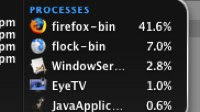


Then came Flock 1.0. I’d never been a Flock fan before, always believing it to be nothing more than Firefox with plugins (Flock is based on the Firefox engine). Having watched the demo at TechCrunch 40 I downloaded the beta of Flock 1.0 and surfed away without incident. Some how the folks at Flock had tweaked the underlying Firefox engine to stop the memory issues.


I was hoping that Firefox 3.0 might finally fix the blight that was Firefox 2. Firefox 3 Beta 1 has been released for testing (download here) so I fired up Firefox 3 and Flock with the exact same tabs opened, hoping that perhaps Mozilla had finally heard the protests of its loyal user base. The stats (image right) say it all.


It didn’t crash in my testing, but having said that the test was fairly short. Firefox was never a browser to crash immediately, usually teasing the user with functionality for some time before deciding that enough was enough, then freezing or crashing all together some time later.
Others have more positive reviews of Firefox 3. I can only hope that by the time it gets to full release it’s as stable as Firefox 1.5 was.


Saturday, November 24, 2007

Add tabs to Windows desktop with Stick


Freeware app Stick adds tabs for RSS, calendar, explorer, notes, and the calculator to the Windows desktop. Stick tabs are highly customizable and can be relocated to any part of the screen. Stick leaves a light (10MB) memory footprint and opens Explorer, Calculator, and the calendar much faster than Windows on its own. By setting your tabs to remain on top and to auto-hide, you can have one-click access to some of your most frequently used apps without disturbing your desktop or existing apps. Stick also acts as a keyword launcher (Windows Key + Space) and has hotkeys baked in so you can access your tabs without the mouse. Stick ain't no Launchy, but its speed, light memory usage, and hotkeys make it well worth the college try. Stick is a free download for Windows only.

Vista Drive icons for Windows XP/2000


Want to keep better tabs on your drive and partition space without having to right-click or open "My Computer"? Free application Vista Drive Icon replaces the standard hard drive icons with Vista-style models that display how much space is taken up and turn red when nearly full. The program runs in the background, shows up in almost every folder view and uses only a small amount of memory.

Friday, November 23, 2007

Display Current Track and Artwork with CD Art Display


Display Current Track and Artwork with CD Art Display


Windows only: Freeware application CD Art Display shows your currently playing track's name, artist and album art in attractive floating skins, in addition to several other useful and completely customizable options. Like previously mentioned moreTunes, CD Art Display supports almost any player you might be using and can automatically download album art if it's missing (though it may not be super high quality), but it also has killer features like customizable hotkeys for playing and skipping tracks and tons of attractive skins. In addition to the floating display, you'll also see your album art embedded in the system tray menu, which is a nice touch. CD Art Display is freeware, Windows only
DOWNLOAD HERE size 1.3mb

Make your Taskbar Transparent


Add transparency to your Windows taskbar and give yourself slightly more usable desktop real estate with freeware application TransBar. While the latter claim (more desktop space) may seem like nonsense, it's especially true for two-row taskbar folks like myself who don't like auto-hiding the taskbar. Whether you want a touch more desktop space or you just want to keep in step with your favorite Windows desktops, TransBar is a simple, lightweight utility that can do both. TransBar is freeware, Windows only.
DOWNLOAD HERE size 87.2kb

Tuesday, November 20, 2007

USB 3.0: 10 times Faster than USB 2.0:


USB, that little rectangular plug that can be found on just about every computer peripheral cable you come across, is one of the biggest success stories in the history of computing. Ditching the slow serial and parallel cables of yore and replacing them with a fast, universal standard that could draw power and allowed connecting of dozens of peripherals without rebooting... well, it was genius. When USB 2.0 arrived, with much faster performance, it got even better. It's not hyperbole to say that USB, despite its humble status as a mere connector, is one of the most important computer technologies to ever be invented.


Well, USB fans, things are going to get even more interesting and soon. USB 2.0 may be fast enough right now, but with more high-definition video products arriving and bigger and bigger files being transferred, that won't be the case forever. Enter USB 3.0, which moves the bandwidth needle from 480Mbps to roughly 4.8Gbps, 10 times faster than the current version.
The new standard, which was recently demonstrated using a new optical cable (but the same connector), will be backward compatible with older USB formats and promises better power efficiency, too, in order to decrease the load on portable devices. Possibly in the works: Better ability to charge devices over USB, some of which still require an A/C adapter or two USB connections to draw enough juice.


Specs are planned to be delivered early next year with commercial availability for 2009. Just do us a favor and clearly label USB 3.0 products with an appropriate logo this time! (USB 2.0 got caught up in a mini scandal when vendors started labeling USB 1.1 products as "USB 2.0 capable," with vendors later claiming they only meant the products worked with USB 2.0 connections. Fail!)

Sunday, November 18, 2007

iPod shuffle bathed in Pure Gold n Diamonds!!

in pure gold and diamond, this elite iPod shuffle by John Harrington is all set to win the heart of the geeks. Designer John has earned a reputation in the industry for producing elegant ornaments. But this time the designer spirit within him has made him design this ultra-unique iPod shuffle fashion accessory. This blinged accessory has been laser imprinted with his autograph ‘Renaissance’ motif and is adorned with five most-admired and exceptional diamonds

Yod'm 3D a virtual desktop manager

Yod'm 3D is a virtual desktop manager with the fashionable effect : the cube


By default, the rotation of the cube is done with the keys CTRL+SHIFT+Arrows :

* CTRL+SHIFT+Left/Right = Next/prev desktop

* CTRL+SHIFT+Up = Activate and show a "far" view of the current desktop, Left and right to turn the cube

* CTRL+SHIFT+Down = Activate and show a "near" view of the current desktop, Left and right to turn the cube

Hold down CTRL+SHIFT to use the mouse to turn the cube.
( The rotation is possible only horizontally )


To move a windows to another desktop :

* Click on the title bar of the window (not maximized if possible), hold down
* Push CTRL+SHIFT to activate the cube, hold down
* When the cube is activated, move the window on left or right
* Release CTRL+SHIFT


To change the wallpaper of a desktop :

Just use Windows !
For each desktop, change the wallpaper using the windows display setting.

Switch to another application :

Click on the Yod'm 3D icon in the taskbar, the list of the windows opened in other desktop appear.
Click on the application to switch to the desktop.

[Download]

Saturday, November 17, 2007

Nokia N95 8GB: 18 Carat Gold, 325 Diamonds


Who won’t love to buy mobile phones decked up with diamonds? Amosu Luxury Phones has lately featured much-in-demand Nokia N95 dipped in a diamond pot.

Alexander Amosu’s limited edition diamond Nokia N95 8GB is a matchless model ever produced. Counted 10 models would be produced; each one festooned with 18 carat white gold and 325 diamonds weighing 3.30 carats.

Each set maintains its exclusivity by using diamonds of different colors or usage of solid classic gold or white gold. The phone also offers the feature of limited edition number from 1-10 and can also be customized with your name. Since it comes under Nokia brand and is also decked up with diamond, so its price has to be shaking.
Price: $24,ooo(Approx 960000 INR!!)

World’s Smallest-Lightest Camcorder: Sanyo’s “Xacti DMX-HD700″


Japan’s electronics giant Sanyo unveils the world’s smallest and lightest 720p high-definition digital camcorder “Xacti DMX-HD700″, packed with 7.1 mega-pixel CCD and a 6.3 - 31.7mm/F3.5 - 4.7 zoom lens to store 3-hour high high-definition movie on a card sized SD memory card. The pocket-sized camcorder weighing 189g would hit the Tokyo market on 19 October.
Price: $600 (approx 24000INR)

Thursday, November 15, 2007

Sony Unveils Walkman NW-A919 Touch Screen Player


The latest offering of a Walkman from Sony, “NW- A919″ holds up to 16GB of flash memory and a 2.4-inch, 320 x 240 pixel display. But you are an unfortunate if you aren’t residing in Japan. Measuring 86.8 × 48 × 12.3-mm, the gadget assists ATRAC together with non-DRMed WMA and AAC, MP3, and linear PCM audio playback with SonicStage doing the sync work back to your PC. The gadget is complemented with unique anti-noise headphones and a battery that offers it a life-span of 6 hours on TV and 36 hours of audio.

Wednesday, November 14, 2007

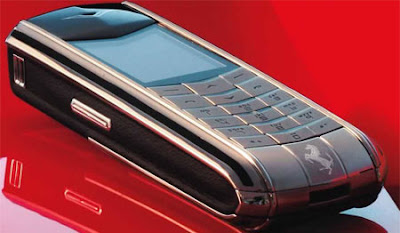
Vertu Ascent Ferrari 1947 Limited Edition Phone launched in India

Vertu has launched its all new Vertu Ascent Ferrari 1947 Limited Edition mobile phone in India. This phone was launched to commemorate Ferrari’s 60th Anniversary, and from the sound of the phone’s name, we feel it’s apt to celebrate 60 years of independence for India as well!

Classy phone maker Vertu worked closely with Ferrari’s design team to develop the Vertu Ascent Ferrari 1947 Limited Edition phone. In fact, just 1947 pieces of this particular model will ever be made. Each of the phones are numbered from 1 to 1947.
The Vertu Ascent Ferrari 19476 Limited Edition mobile phone has been handcrafted in the UK with the same precision and attention to detail given when assembling a Ferrari

The Vertu phone also features 4 hours of talk time, with up to 270 hours standby, Bluetooth support, large memory capacity that can store up to 1000 ocntacts, 900 calendar notes and 100 SMSes.