Welcome to Gizmos4Fun. Your Guide To the Future Technology

Tuesday, January 22, 2008

LG's Watch Phone


It's only a concept for now, but LG's phone-in-a-wristwatch prototype was drawing big crowds at CES on Monday.

Specifications were scarce for the watch phone; indeed, LG reps wouldn't even take it out of its glass case, and from what I understand, the watch on display can't even make calls (although building a GSM or CDMA radio into the wristwatch wouldn't be a problem, I'm told). The cool display isn't a touch screen; instead, a jog dial on the side of the casing lets you scan through the various menus. Bluetooth and SMS messaging would potentially be part of the package, along with voice commands for barking orders, Dick Tracy-style.

Cool concept, right? Although after pondering the reality of a watch phone for a bit, I'm not sure I'd want one; you'd pretty much need a Bluetooth headset for every call, unless you're fine with everyone in earshot hearing both ends of your conversations (assuming the watch has an external speaker, of course, which doesn't seem likely). Still, you can dream.

That said, the LG watch phone looks more like a really cool idea than a shipping product; indeed, the LG reps on hand wouldn't even speculate on pricing or a release date.

Thursday, January 17, 2008

SABSEBOLO.com Free conferencing Site!

Hotmail co-founder Sabeer Bhatia has launched SabseBolo.com, a free conferencing facility, a few months after launching Live Documents, an online office application.


"Through SabseBolo.com, we are targeting small and medium enterprises and entrepreneurs. But anyone can use this facility. It is absolutely free," Bhatia said.
People can visit the website and register themselves. Once registered they would get a conference ID and PIN, which could be shared for conferencing.


Revenue would be generated through commercials. "Before the conference begins there would be a five-second commercial. We have not decided the tariff as yet. It could be as low as Re 1 per 5-second commercial," Bhatia said.


The idea to set up a free conferencing facility came to Bhatia when he had to make a conference call to his offices in Mumbai, Bangalore and Delhi. "The existing facilities are too costly. With Sabsebolo.Com, conferencing is free now,"
G4F Verdict : " Its indeed a welcome sign, as Entrepreneurs would get the most of it.. Thus saving Time"

Wednesday, January 16, 2008

CES '08 ::MacWorld 2008: Apple Macbook Air Steals the Show!

The new Macbook Air – 'the world's thinnest notebook' – was clearly the highlight of Apple CEO Steve Jobs' keynote at MacWorld 2008 which has just kicked off in San Francisco. But here's a quick summary of the major announcements from the keynote:


>Macbook Air – a super thin laptop with an 80GB hard drive or a 64 GB SSD but no inbuilt CD/DVD drive.
>Time Capsule – a 1 Terabyte hard disk which also doubles up as a Wi-Fi base station and allows Mac users to wirelessly backup all their data.
>Free software update for the iPhone – version 1.1.3
>Paid software upgrade for the iPod Touch, which includes new apps like Maps, Mail, Weather, Stocks etc.
>iTunes movie rentals, including HD movies.
>New software and lower price for Apple TV.
>Free digital copies of purchases of 20th Century Fox DVDs


The first two in the list above should be available in India in about a month if recent Mac launches' time-to-India are anything to go by. We suspect though, that US demand for the Macbook Air will delay its availability in Asia and therefore India for longer than four weeks.


The iPhone software update will take a while to be cracked so Indians using hacked iPhones will not be able to take advantage of the update immediately. However, once it IS cracked, the much desired "SMS to multiple contacts" feature will be a welcome relief.


The fact that existing iPod Touch users will have to pay ($20 if you have an iTunes account, which itself is not possible with an Indian credit card!) for the software update is a major downer! If the iPhone update is free, why charge for iTouch? New iPod Touches though will come with the new software, so we advise you not to buy the iPod Touch in India till the new ones have hit the shelves in a few weeks.


The iTunes store is not officially accessible in India and neither is Apple TV so the last three don't really matter to Indian readers of Gizmos4Fun but I'm sure many of our tech-savvy international readers are scoffing at the last item. Nearly everyone who legally purchases DVDs has figured out how to create digital copies of their own stuff, but then again, the movie and music industries seem to be in denial. We're surprised that Disney didn't sign up on this as well, since Steve Jobs is the company's largest shareholder.


GIZMOS4FUN(G4F) Verdict: '' Though looks and sounds good, but without an optical drive and ethernet card, any major computer giant can produce a worlds thinnest Laptop''

Tuesday, January 15, 2008

Quick USB Ejector


A program that allows you to quickly remove USB devices in Windows. It was originally designed to remove only USB pen drives but will now eject any USB device. It can be run as a non-visual command line program or a normal gui program. Its very useful if you have a USB flash/pen drive, especially if you use a menu such as PStart or the Portable Apps launcher.


The command line options are very flexible, they can be used to:
>Eject the drive that the program is running from.
>Eject a drive by specifying a drive letter.
>Eject a drive by specifying a drive name.
>Eject a drive by specifying a partial drive name.


When run as a ‘normal’ GUI program the tools enables USB devices to be quickly ejected through a mouse click or keyboard press. It’s especially useful when dealing with multiple USB devices and for Vista users who don’t want the ‘now safe to remove this device’ dialog box to appear.


The program has been tested on WindowsXP and Windows Vista but should also work on older versions of Windows.
DOWNLOAD HERE (Current Ver 1.1)

Monday, January 7, 2008

Hands On Review of Moto ROKR E8

The Unusual Motorola!!
The Motorola ROKR E8 has often been referred to as the "morphing phone," and why shouldn’t it? The keyboard actually changes based on what function of the phone you wish to use.When you’re making a call at the home screen, you’d obviously want the full keyboard there. When you’re about to snap a flick, you get zoom in and out keys, a playback key for viewing recently taken photos, and a video camera key for switching to video mode. In music mode, the keyboard displays next and previous keys, a play / pause key, a shuffle playback key, and a repeat key. The actual device is pretty sharp, too. The entire front is like one smooth surface with a huge touch-sensitive "ROKR" (scroll) wheel in the middle.What’s incredible, is that there is absolutely no tactile feedback on any of the keys when the phone is off. It’s just a flat surface with little dots to help guide your fingers. But when it’s on, haptics lends support when you’re pressing a button, but it actually makes the keys press. Hard to explain, but there is definitely tactile feedback on a key press and not just the normal haptics vibrate. As far as we can tell, the Motorola E8 features a 2 megapixel camera, Bluetooth (with various profiles including A2DP), and is a quad-band GSM/EDGE device. You’ll also notice a 3.5mm headset jack at the top of the phone, which is a little awkwardly placed if you ask us. The Motorola E8 runs a newer version of the MOTOMAGX platform, so Motorola RAZR 2 V8 users will have no problem getting used to the new handset. We’re trying to track down a release date now, and we have no word on what carriers here in the U.S. will be jumping aboard to carry it at this point. All in all, it’s not going to take over the world, but with its thin and sleek profile complete with a unique keyboard and excellent call quality, we could see ourselves using this every day.
courtesy:modmymoto.com

Friday, January 4, 2008

Track the Amount of Time You Spend Online in Firefox

Everybody makes New Year's resolutions, and I wonder how many of you made the resolution to waste less time browsing the internet? If so, here's an easy way to track the amount of time you spend online.


The TimeTracker extension for Firefox gives you a really easy way to track the time you spend directly in front of your browser. The timer only ticks if you are browsing, and you can exclude work-related sites from the timer as well.


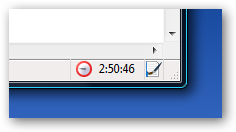
Once you install the extension, you'll notice a little timer down in the lower right-hand corner.


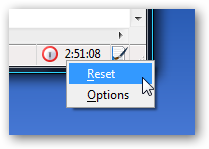
If you right-click on the clock, you'll get a menu where you can easily reset the timer or get to the options page.

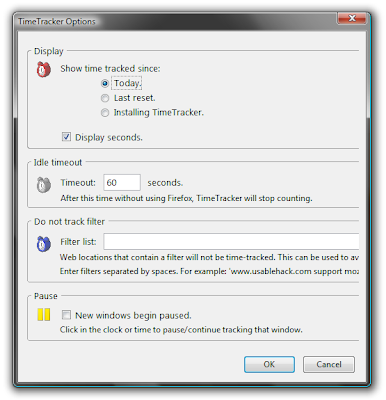
In the options page, you can choose if you want to track the time per day, or cumulative, and you can change a very important setting… turn off the seconds timer so you won't see the thing change constantly (very annoying).

You'll also want to note the "Do not track filter", where you can put in a space delimited list of sites that won't be tracked. This is useful if you want to include work applications, or productivity sites like one of the many to-do lists out there.
It's amazing how much time I spend online… too much.

Monday, December 31, 2007

Speed Up Your Internet Explorer...

1. Type “Regedit”

2. Goto HKEY_CURRENT_USER >> Software >> Microsoft >> Windows >> CurrentVersion.

3. Click on Internet Settings so you can view its contents.

4.Check Regedit’s right-hand column for the following two lines (values): “MaxConnectionsPerServer” and “MaxConnectionsPer1_0Server”
If these values are present. If not present follow the instructions in bracket.

{{If These values r not present right click on the white region of Regedit’s right-hand column, click “New”, and then click “DWORD Value”.
Enter MaxConnectionsPerServer for the name of the new “DWORD Value” and press Enter. The new value should now appear in Regedit’s right-hand column.
Right-click the new value and click “Modify”.}}

right-click on the first value (MaxConnectionsPerServer),

5. select “Modify” from the drop-down menu, click “Decimal”, and set the Value data field to 6.

6. Close all running I.E. windows and Voila!! test to see your increased speed.