Welcome to Gizmos4Fun. Your Guide To the Future Technology

Tuesday, October 2, 2007

LogiTech ergonomic Keyboard


Logitech announces a new ergonomic keyboard that will be in store this August for only $89, pretty cheap, and now we ask what does it do?
Not much new fancy stuff, but instead a cool design focused on some ergonomic technology. The Logitech keyboard is shaped like waves, so the keys are arranged along a wave-like pattern that ripples across the keyboard. This design is supposed to account for the fact that your fingers are not all the same length, thus the keys the keys near your little fingers and your thumbs rise up to meet your shorter digits. The other feature is the gradual arc of the key tray.
If I must say so, I really like the design, kind of futuristic and also much like a classic keyboard, so I would buy it if my other keyboard would ever break down.

Wooden Usb PenDrives!!


Okay there is not much new on the technology side with this thing, but a very cool and creative design.
An USB memory stick looking like a wooden stick. Plug it to your computer USB port and it will look like a wooden stick grow from your USB port.
Not to mention their individual and unique design, because they are handmade, so not two will look the same.
Very funny indeed.Its available as 256 mb, 512 mb, 1GB and 2GB storage.

Fun Clock Projector Key Chain

This is a fun little cheap gadget, this is quite fun, I have seen them as clocks standing on a desk projecting the time on the wall, now you can have it as an projector in a key ring.

All you need to do is to point it at a wall and press, then it will light up and area projecting the time or date. It even has a second counter.

And it is also quite cheap. $12.95

Monday, October 1, 2007

5 Ways Accelarate Your Windows XP

1. Turn Off System Restore

System Restore can be a useful if your computer is having problems, however storing all the restore points can literally take up Gigabytes of space on your hard drive. To turn off System Restore:


a. Open Control Panel
b. Click on Performance and Maintenance
c. Click on System
d. Click on the System Restore tab
e. Tick "Turn off System Restore on All Drives"
f. Click "Ok"

2. Make Your Menus Load Faster
This is one of my favorite tips as it makes a huge difference on how fast your machine will "feel". What this tips does is that removes the slight delay between clicking on a menu and XP displaying the menu.

a. Go to Start then Run
b. Type "Regedit" then click "Ok"
c. Find "HKEY_CURRENT_USER\Control Panel\Desktop"
d. Select "MenuShowDelay"
e. Right click and select "Modify"
f. Reduce the number to around "100"

3.Disable System Sounds
Surprisingly, the beeps that your computer makes for various system sounds can slow down particularly at startup and shut-down. To fix this turn off the system sounds:

a. Open Control Panel
b. Click Sounds and Audio Devices
c. Check Place volume icon in taskbar
d. Click Sounds Tab
e. Choose "No Sounds" for the Sound Scheme
f. Click "No"
g. Click "Apply"
h. Click "OK"
i. Improve Boot Times

4. Improve XP Shutdown Speed
This tips reduces the time XP waits before automatically closing any running programs when you give it the command to shutdown.

a. Go to Start then select Run
b. Type "Regedit" and click ok
c. Find "HKEY_CURRENT_USER\Control Panel\Desktop" Select "WaitToKillAppTimeout"
d. Right click and select "Modify"
e. Change the value to "1000"
f. Click "OK"
g. Now select "HungAppTimeout"
h. Right click and select "Modify"
i. Change the value to "1000"
j. Click "OK"
k. Now find "HKEY_USERS\.DEFAULT\Control Panel\Desktop"
l. Select "WaitToKillAppTimeout"
m. Right click and select "Modify"
n. Change the value to "1000"
o. Click "OK"
p. Now find "HKEY_LOCAL_MACHINE\System\CurrentControlSet\Control"
q. Select "WaitToKillServiceTimeout"
r. Right click and select "Modify"
s. Change the value to "1000"
t. Click "OK"

5. Improve Swapfile PerformanceIf you have more than 256MB of RAM this tip will improve your computer performance. It will be sure that your PC uses full capacity of memory (faster than the swap file) before it uses the swap file.
a. Go to Start then Run
b. Type "msconfig.exe" then ok
c. Click on the System.ini tab
d. Expand the 386enh tab by clicking on the plus sign
e. Click on new then in the blank box type "ConservativeSwapfileUsage=1"
f. Click OK
g. Restart PC

Apple iPhone a copy of Chinese Phone!!


While people are queuing and waiting in long list for an Apple iPhone, the Chinese Meizu had it’s striking appearance of almost the same-featured iPhone. That’s a Meizu M8 Phone. The Meizu M8 has the look and feel as an iPhone. Although people are going to but the iPhone they’ll have to think back after seeing this small rather big in use gadgets.
Meizu had been around before Apple and they are known for their gadgets. Now with a sleek and rather humble they had announced the M8 as a gadget that will fit all the customer needs.

Although this is Meizu entered the mobile phone industry in the first, but it appears appetite is not small, iPhone using Mac systems, M8 said with it’s Win CE 6.0 operating system, ARM processor hardware II + Video decoder (support 720 × 480 pixel video recording of 30). To a mobile phone equipped with a special decoder, it seems Meizu M8 for the positioning, not just music, but also stressed the Video Player. Not all mobile phones has a unique touch of CODECS that allows many features, one who knows codes will fall in for this gadget’s as well.
The Meizu M8 is planned to be released on December 2007. But Apple iPhone was release earlier so that they’ll get all the market for it. But a wise customer will see it difference’s in no time.
The price also seems to be rather affordable.Apple iPhone4Gb = $ 499.008Gb = $ 599.00
Meizu M8 Official PricingEntry : 1499 CNY for 4GB, 2199 CNY for 8GBStandard: 2380 CNY for 4GB, 3080 CNY for 8GB

Canned Memory Card Readers!!!!!!!!


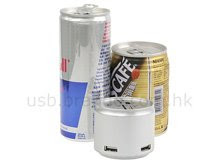
We always see are used for storing soft drinks on it but now, we may have various content of flavour's. But this one only for card readers. There are dozens of card readers in the market but this has not stopped manufactures from coming out with new models of card reader. Card reader device that comes with 3 USB 2.0 ports, giving you the flexibility of expanding your computer connectivity options.


The Card Reader supports Secure Digital, xD, Memory Stick, MiniSD and MicroSD. You won’t need any other adaptor for the microSD card since it comes with a dedicated slot, which is a good thing. Strange to see why compact flash has been left out of the equalization since many higher-end digital cameras still use CF as the memory card format of choice.


The Can Card Reader measures 59 by 49mm and weighs 60grams.
System Requirements:Windows 98/98SE/ME/2000/XP
The package comes in Canned Shape Card Reader + 3-port Hub Combo and also aUSB Cable.


Hidden Battery Power For Nokia Mobile Phones!!!

Can you imagine your mobile phone battery is very low and you expecting an important phone call. Or you’re in a emergency. What would you do? Borrow someone else’s mobile to make that call or just wait till the battery dies off.

Nokia Instrument comes with a reserve battery function and can only be activated via a simple code.

To activate this:Press the keys *3370# on your mobile phone and it will restart with this reserve and the mobile phone battery indicator will show a 50% increase in your battery.


This reserved will get charged when you’re back charging the mobile phone. Simple yet useful