Welcome to Gizmos4Fun. Your Guide To the Future Technology

Saturday, November 10, 2007

Internet Explorer 8

IE-8 Leaked Images n a sneak review

First Screenshots from Internet Explorer 8 - Leaked - Fakes?
Internet Explorer 8 is a product under development. Microsoft is currently dogfooding alpha versions of the browser but no additional details have been made available from the Redmond company. By contrast, both Mozilla and Apple feature more opened development models with Firefox 3.0, not up to Gran Paradiso Alpha 6, and Safari 3. And while rival browsers from Apple and Mozilla are scheduled to be made available by
the end of 2007, Safari 3 in October and Firefox 3.0 in November, speculations reveal that Microsoft plans to deliver the first beta for IE8 this year.The anticipation of IE8 is building up, and screenshots alleging to be taken from the alpha version of the browser have apparently leaked on the Internet. Microsoft has confirmed that it is running versions of post-Internet Explorer 7 inhouse. Bruce Morgan - a Software Development Manager, IE Team and responsible with leading the Vista RSS
platform, IE UX, and IE setup teams at Microsoft, revealed in a thread over at Microsoft's Channel 9 that Internet Explorer has moved into the next stage.
Believing that the screenshots are the real deal is a stretch of the imagination, by any standards. What you are looking at is a combination between the current graphical user interface of Internet Explorer 7 (the tabs) and the Ribbon from the Office 2007 System. The images feature a healthy level of Photoshop skill, but there are little details that point out the fact that they are fakes, as for example, the Channel 9 Coffehouse reference at the top of every image. The text corresponds to the title of the webpage the browser is on. And yet the only opened pages point to Google. But while the screenshots are indeed fakes, they offer an interesting view on what the GUI of IE8 would look like with the Ribbon from the Office 2007 System.
This is an easy guess, IE7 is out already and IE8 is set to be released in mid-2008, so we can fully expect IE9 to ship with Windows 7. Internet Explorer 7 was a rather rushed release, as Microsoft tried to stem the growth of Mozilla Firefox, and most of its new additions (such as tabs) seem flaky at times. Therefore we can expect IE8 to be a solid release, which, rather than introducing new features, improves the current feature-set, and makes the UI much more responsive.

Wednesday, November 7, 2007

Get song lyrics while playing a song !!!

Here's a very cool little plugin called Lyrics Plugin for Winamp or Windows Media Player that displays song lyrics when you start playing a song ! You no longer have to go searching the internet for the song lyrics ! Simply play your MP3 file and a few magical seconds later all of the lyrics for that song show up automatically !!!

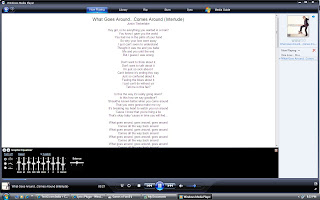
THE BEST PART OF THIS IS IT SHOWS ANY LANGUAGE !! HERE's My Screen Short


Once installed, for example in Windows Media Player on my computer, choose a song from the libray and begin playing it. Then click on the Now Playing button across the top and the lyrics screen will show up. Of course, this program will not find all of the lyrics for every song, but if you feel up to you can add the lyrics yourself! But from my testing, any popular song or half-decent band's songs were all found and they were correct.


Download Here for

How to enable DreamScene Video Wallpapers in ALL Windows Vista Versions


DreamScene is a feature that enables users of Windows Ultimate editions to set up animated backgrounds instead of the mundane static wallpapers. But Microsoft has limited the availability of this feature only to the Ultimate edition of Vista. While a workaround for enabling the actual DreamScene feature in the other version of Vista is not yet available, users can employ an alternative with similar results.
The fact of the matter is that this method will not get DreamScene working on your machine, but the effect will be similar to that delivered by the original. It may require some amount of effort on your behalf, but go along with me on this one. It will be worth it.
First off, you will need the latest edition of VLC Player[Freeware]. After downloading and installing VLC Player make your way to Settings > Preferences > Video > Output Modules > DirectX In order to see all the settings available, you will have to check the Advanced options box in the bottom right corner. Enable Wallpaper Mode is such an advanced option; it is disabled by default, but you can just enable it by checking the box next to it.
Now it's time to simulate the behavior of DreamScene. In this sense, navigate to Settings > Preferences > Interface > Main Interfaces > wxWidgets and simply uncheck the box next to the Taskbar option. This will remove VLC Player from the Windows Taskbar while the application is running, and it will be running extensively. And if you select Settings > Preferences you will also be able to loop a single video fragment.

FERRARI’S LATEST SEDUCTRESS

Ferrari's Newest Release


Ferrari now has Seven-times Formula 1 World Champion Michael Schumacher joining the ranks of the client test drivers and gave the pro gramme the benefit of his vast experience on several occasions. Maranello’s engineers studied the wealth of information gained to develop a kit which will cut the Ferrari FXX’s Fiorano lap time to under 1′16” (previously it was 1′18”). The FXX’s has a 6262 cc V12 engine which can punch out a massive 860 hp at 9500 rpm. Gear shifting takes just 60 ms, a drop of 20 ms on the previous time, and the gear ratios have been adapted to make use of the extra 1000 rpm now delivered by the engine. The car’s new aerodynamics and traction control system are developed in close collaboration with the GES Racing Division engineers. The driver now has a choice of no less than nine different settings (plus the off position) which are selected using a switch on the central tunnel to to tune FXX as per personal style of driving. This feature also allows the driver to modify the car’s behavior on the track from corner to corner, just as the Formula 1 drivers do to maximize performance and reduce tyre wear and engine heat load. The FXX’s traction control is also has less invasive and more flexible, adapting more efficiently to the individual driving style of each driver - a requirement pinpointed when this very extreme car was being driven on the track by non-professional drivers.


Iam just stunned by the sexy piece Ferrari has come up with this time, the sparkling red only makes it much more tempting!. I am now going to just stop drooling at this beauty and play a lotto game, that’s the only way i can ever lay my hands on it , you too can try the same

Monday, November 5, 2007

How to Improve Your Wi-Fi Network's Performance


First, make sure you are getting the most out of your current Wi-Fi router: Mount it in a central location in your house, preferably high on a wall; make sure that other 2.4-GHz devices such as cordless phones, baby monitors, wireless audio speakers, Bluetooth gadgets, and microwave ovens are not causing interference; and separate your router from your neighbors' router on the Wi-Fi spectrum. If they are using channel 1, for example, try channel 12 to minimize the chance of cross-channel interference.


If you still get a poor signal, consider upgrading to a router that incorporates MIMO (multiple-input, multiple-output) or draft-n technology. (See our latest review of these devices, "Wireless Routers: The Truth About Superfast Draft-N"). These routers not only provide far greater range than standard 802.11b/g routers, but they also boost speed by as much as ten times.


Finally, if you have particular Wi-Fi trouble spots in your house, such as odd corners, a basement, or an attic, power-line networking can be a great way to serve those areas. With power-line devices, you simply plug one adapter into a wall outlet and run an ethernet cord to your router; then you plug another adapter into an outlet near the device you want to connect to the network and run an ethernet cord to that device. You'll need reasonably clean power--free from excessive interference from other electrical devices--but the newest technologies, such as HomePlug AV and HD-PLC, work very well.


For More Keep Visiting This Blog.


Source Yahoo News


Saturday, November 3, 2007

Nabaztag 2 WiFi Rabit


One rabbit that'll keep you entertained for hours. As soon as I opened it, I headed to Nabaztag.com to configure my Wi-Fi settings so it could start updating me on everything. You see, Nabaztag is a Wi-Fi enabled bunny that can gather information from around the Internet, and reads it for you. If you want to know what's happening on your favorite blogs, you simply go to Nabaztag.com, add your favorite RSS feeds to your Nabcasts feeds, and it'll read the latest headlines every 20 minutes (you can change the frequency). That's only a fraction of what it can do. Once you become a Nabaztag owner, the customization possibilities are endless.


Nabaztag has been around since 2005, but was recently upgraded in 2007 with even more features than before. The latest version has a microphone on its navel so you can talk to your rabbit. Anytime you press a button between its ears, and give him a command such as "weather", it's quick to respond. You can send voice messages to other Nabaztag owners by speaking into its navel, as well.


Since the bunny has speakers, you can easily stream music or play podcasts you find on the Web for an unlimited time. It also has an audio output on his back so you can connect headphones or speakers, depending on your situation. If you're at work, you might want to keep him plugged to your headphones, but if you keep it at home, you can set it anywhere in the house so it can keep you updated on incoming email, weather, stocks, or news headlines. If you happen to own an iDog, you can plug him into Nabaztag so he too can read messages or play music.

Friday, November 2, 2007

iPod Nano Synced With Nike


This is what two of the world's largest corporations, Nike and Apple, leaders in their own respective fields got together to give us in India today, the Nike + iPod. It’s really not as vague or as perhaps simple as it sounds. But these two companies, together, have brought together a rather unique product and system that all you joggers and music lovers can truly enjoy.


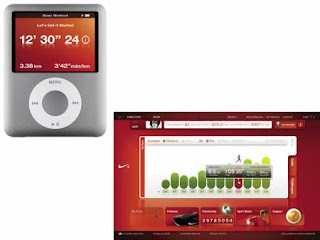
Nike has designed a newly styled shoe called the Air Zoom Moire that has a little space in the sole of the left shoe that houses the Nike + iPod transmitter. The receiver that comes with the set fits into your iPod Nano. The bad thing is this system is designed specifically for the Nano and no other iPod device. The good thing is, it’ll work even with your First Generation Nano and of course the latest Nano Video version. Once hooked up you can begin your run and the data (up to a 1000 runs) gets stored in the iPod. It can calculate the speed, distance and calories lost.


It doesn’t just record this information, store it and show you a read out at the end of your work out. It can also give you information on the go through your earphones while you’re working out. When you dock your iPod with your PC and are hooked up to the net, it will direct you directly to www.nikeplus.com where you can save all of your run data and analyze, compare and review it with an easy to use interface. You can also pre cue any particular ‘Power Song’ just to give you that motivational burst of energy to help you get along. There are also options to set specific goals you want to reach and all this can be monitored from the Nike+ website. Registration is of course free.


Attending the event were sports stars Anju Bobby George who’s training for the 2008 Beijing Olympics and Cricketer Dinesh Kaarthick. They gave us an insight into their experience with Nike + iPod and how useful the Nike+ website has been for them and their training regimen


The Nike + iPod Sports kit is available at select Nike and Apple stores and is priced at Rs. 2,000. There are plenty of Nike+ shoes to choose from that range from Rs. 6,200 onwards. There are also accessories designed for use with the kit like jackets, tops etc. with waterproof pockets to protect your iPod.

Source: Tech2