A simple text file edit makes sites redirect to another. When you type address in address bar in any browser and enter it then it will display another web page, for example:- when you type Google.com you will be redirected to yahoo.com
Instructions to do:
1) Go to this directory [c:\windows\system32\drivers\etc], directory may change according to drive used for os installation
2) then hit enter
3) find a file named "hosts"
4) Right click on it and open with word pad.
5) In the last link of the document type the IP* address of yahoo space www.Google.com (Vice versa for other sites)
6) now save i7
7) restart the browser if its already running
8) Now try it, It works perfectIP*: to find IP address of that website Goto start ->Run > type cmd > enter. Now you have a new window on desktop. On that type this without cotes "ping www. yahoo.com"replace yahoo.com with your preferred site and then enter it
Tuesday, October 30, 2007

How to pick a geniune Password

When it comes to security, Bruce Schneier is a god among us mere mortals. He has written some of the most influential books on computer security and cryptography ever printed, and his blog is essential reading for anyone on the Internet.
So when Bruce says here's how to create a secure password (and how he creates his own passwords), I listen. His post on the topic is extensive, so I'll try to boil it down to the essentials. If you have the time, I encourage you to read the whole thing, though.
First question: How are passwords cracked, anyway? Primarily through brute force "dictionary" attacks, where software tries to guess a password by running through a series of common phrases or words in various combinations. Sure, we know that "password" and "qwerty" are easy to crack, but password crackers have gotten much more sophisticated these days. Now, they check hundreds of these common "root" passwords (here's a list)... in combination with various "appendages," including all two- and three-digit combinations, single symbols (like ! and ?), dates from 1900 on, and a few others.
The crackers also sub in common characters like "3" for "E" and other typical hacker-speak substitutions.
What's that mean? Basically, if you thought the safe-looking pigl3t9! was a secure password, you're sadly mistaken. Any modern password cracker will suss it out in a matter of minutes.
Before you begin to despair, Schneier offers simple rules on how to create a password that cannot be easily cracked by such methods. (Mind you, given enough time, any password can be cracked, though. But this will make it much harder.)
The trick is to use a "root" that is not in that list that I linked above, and to put your "appendage" (or two of them) in an unusual place: Either in the middle of the root or at both the beginning and the end.
So when Bruce says here's how to create a secure password (and how he creates his own passwords), I listen. His post on the topic is extensive, so I'll try to boil it down to the essentials. If you have the time, I encourage you to read the whole thing, though.
First question: How are passwords cracked, anyway? Primarily through brute force "dictionary" attacks, where software tries to guess a password by running through a series of common phrases or words in various combinations. Sure, we know that "password" and "qwerty" are easy to crack, but password crackers have gotten much more sophisticated these days. Now, they check hundreds of these common "root" passwords (here's a list)... in combination with various "appendages," including all two- and three-digit combinations, single symbols (like ! and ?), dates from 1900 on, and a few others.
The crackers also sub in common characters like "3" for "E" and other typical hacker-speak substitutions.
What's that mean? Basically, if you thought the safe-looking pigl3t9! was a secure password, you're sadly mistaken. Any modern password cracker will suss it out in a matter of minutes.
Before you begin to despair, Schneier offers simple rules on how to create a password that cannot be easily cracked by such methods. (Mind you, given enough time, any password can be cracked, though. But this will make it much harder.)
The trick is to use a "root" that is not in that list that I linked above, and to put your "appendage" (or two of them) in an unusual place: Either in the middle of the root or at both the beginning and the end.
Monday, October 29, 2007
Clear IE-7 using Command Line
If you like to build batch files to automate cleanup on your computer, you'll probably want to include at least one of these commands in your batch script. You can automate any one of the functions on the Internet Explorer 7 Delete Browsing History dialog.
Here's the dialog that you are probably used to seeing:
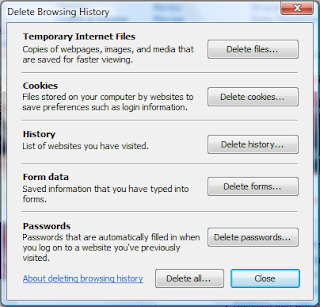
Here's the dialog that you are probably used to seeing:

And here's the commands that correspond to the different buttons. The most important one from a cleanup perspective is the first, which will delete just the temporary internet files that are cluttering up your computer.
To use these commands, just run them from the command line, the start menu search box in vista, or a batch file.
Temporary Internet Files
RunDll32.exe InetCpl.cpl,ClearMyTracksByProcess 8
Cookies
RunDll32.exe InetCpl.cpl,ClearMyTracksByProcess 2
History
RunDll32.exe InetCpl.cpl,ClearMyTracksByProcess 1
Form Data
RunDll32.exe InetCpl.cpl,ClearMyTracksByProcess 16
Passwords
RunDll32.exe InetCpl.cpl,ClearMyTracksByProcess 32
Delete All
RunDll32.exe InetCpl.cpl,ClearMyTracksByProcess 255
Delete All - "Also delete files and settings stored by add-ons"
RunDll32.exe InetCpl.cpl,ClearMyTracksByProcess 4351
Saturday, October 27, 2007
Take your PC IN YOUR PENDRIVE!!!
Take your Digital Mojo (your software, settings and data) with you on ANY device, and run on ANY PC*.
MojoPac can be installed on your iPod, USB flash drive, or any other device with a USB drive like your USB-enabled mobile phone. There’s no need to lug your laptop along. MojoPac allows you to take all your communications, music, games, applications, and files with you, on a device that fits in your pocket!
MojoPac is a technology that transforms your iPod or USB Hard Drive or Flash drive into a portable and private PC. Just install MojoPac on any USB 2.0 compliant storage device, upload your applications and files, modify your user settings and environment preferences, and take it with you everywhere.
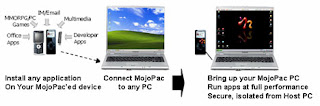
Every time you plug your MojoPac-enabled device into any Windows XP PC , MojoPac automatically launches your environment on the host PC. Your communications, music, games, applications, and files are all local and accessible. And when you unplug the MojoPac device, no trace is left behind – your information is not cached on the host PC.
NOTE: 1)The current version of MojoPac requires administrative privileges on the host PC. We have an “Authorized Administrative Privileges” setting available today which is an ideal solution for enterprises, universities, libraries or other environments.
2) The support for Windows Vista is to be released shortly.
Privacy
With MojoPac, your personal information is never left behind. When you unplug your MojoPac device from any host PC, all browsing history, Multimedia Player history, applications history, files and personal settings are removed along with it. Additionally, all the sensitive information that you want to protect, such as financial applications or your private communications, can be installed on your MojoPac device, keeping them off of your PC and inaccessible to anyone.
Playability
You don’t have to limit yourself to playing your favorite PC games at home. MojoPac allows you to install the most popular PC and online games, and take them with you wherever you go. Just plug your MojoPac device into any Windows XP PC and launch your game with your settings and the state of your game from the last time you played. World of Warcraft at work… Everquest II at your girlfriend’s… Half-Life at the family reunion… game on! And MojoPac will never leave a trace behind on the host PC.
Protection of IT Policies
Install the applications that IT has not approved on your MojoPac device. Use your preferred browsers, communications software, and security applications without installing them on your work PC.
Power Supply
Use your MojoPac device to replicate your laptop, and never hibernate again. When one power supply is drained, simply plug MojoPac into another desktop or laptop PC and you’re up and running again immediately.
Personal Preferences
Easily toggle back and forth between your PC and your MojoPac. Each presents you with whatever personal preferences and environment you have chosen for that system. You can keep your serious work view on your PC, and your fun play view on your MojoPac, keeping them separate even when running them simultaneously.
iPod Liberation
With MojoPac, you can install iTunes and QuickTime on your iPod, plug into to any Windows XP PC, and download songs and Podcasts. Your iPod never needs to be dependent on a specific PC to get access to iTunes!
Painless PC Sharing
Every user in your house can instantly have his or her personalized client experience on one PC without altering a single setting or file. With MojoPac, not only can everyone keep their own applications, downloads, files, games, browser settings, MP3s and IM buddies off of the main hard drive, they can take those to any other PC and have the same user experience that they have at home.
PC Resurrection
Replicate your PC on a MojoPac device and use it as a secure back-up for your applications, files and preferences. If your PC goes RIP, simply plug in your MojoPac to a new laptop and be up and running immediately!
SOURCE: www.mojopack.com
MojoPac can be installed on your iPod, USB flash drive, or any other device with a USB drive like your USB-enabled mobile phone. There’s no need to lug your laptop along. MojoPac allows you to take all your communications, music, games, applications, and files with you, on a device that fits in your pocket!
MojoPac is a technology that transforms your iPod or USB Hard Drive or Flash drive into a portable and private PC. Just install MojoPac on any USB 2.0 compliant storage device, upload your applications and files, modify your user settings and environment preferences, and take it with you everywhere.
Every time you plug your MojoPac-enabled device into any Windows XP PC , MojoPac automatically launches your environment on the host PC. Your communications, music, games, applications, and files are all local and accessible. And when you unplug the MojoPac device, no trace is left behind – your information is not cached on the host PC.
NOTE: 1)The current version of MojoPac requires administrative privileges on the host PC. We have an “Authorized Administrative Privileges” setting available today which is an ideal solution for enterprises, universities, libraries or other environments.
2) The support for Windows Vista is to be released shortly.
Privacy
With MojoPac, your personal information is never left behind. When you unplug your MojoPac device from any host PC, all browsing history, Multimedia Player history, applications history, files and personal settings are removed along with it. Additionally, all the sensitive information that you want to protect, such as financial applications or your private communications, can be installed on your MojoPac device, keeping them off of your PC and inaccessible to anyone.
Playability
You don’t have to limit yourself to playing your favorite PC games at home. MojoPac allows you to install the most popular PC and online games, and take them with you wherever you go. Just plug your MojoPac device into any Windows XP PC and launch your game with your settings and the state of your game from the last time you played. World of Warcraft at work… Everquest II at your girlfriend’s… Half-Life at the family reunion… game on! And MojoPac will never leave a trace behind on the host PC.
Protection of IT Policies
Install the applications that IT has not approved on your MojoPac device. Use your preferred browsers, communications software, and security applications without installing them on your work PC.
Power Supply
Use your MojoPac device to replicate your laptop, and never hibernate again. When one power supply is drained, simply plug MojoPac into another desktop or laptop PC and you’re up and running again immediately.
Personal Preferences
Easily toggle back and forth between your PC and your MojoPac. Each presents you with whatever personal preferences and environment you have chosen for that system. You can keep your serious work view on your PC, and your fun play view on your MojoPac, keeping them separate even when running them simultaneously.
iPod Liberation
With MojoPac, you can install iTunes and QuickTime on your iPod, plug into to any Windows XP PC, and download songs and Podcasts. Your iPod never needs to be dependent on a specific PC to get access to iTunes!
Painless PC Sharing
Every user in your house can instantly have his or her personalized client experience on one PC without altering a single setting or file. With MojoPac, not only can everyone keep their own applications, downloads, files, games, browser settings, MP3s and IM buddies off of the main hard drive, they can take those to any other PC and have the same user experience that they have at home.
PC Resurrection
Replicate your PC on a MojoPac device and use it as a secure back-up for your applications, files and preferences. If your PC goes RIP, simply plug in your MojoPac to a new laptop and be up and running immediately!
SOURCE: www.mojopack.com
Thursday, October 25, 2007
Add a WebSite Link to your Start Menu
To Install: Copy the code below to notepad and save it as link.reg then just right click on it and choose "merge" and RESTART.
Windows Registry Editor Version 5.00
[HKEY_CLASSES_ROOT\CLSID\{2559a1f6-21d7-11d4-bdaf-00c04f60b9f0}]@="GIzmos4Fun"
[HKEY_CLASSES_ROOT\CLSID\{2559a1f6-21d7-11d4-bdaf-00c04f60b9f0}\DefaultIcon]@="%SystemRoot%\\system32\\shell32.dll,-47"
[HKEY_CLASSES_ROOT\CLSID\{2559a1f6-21d7-11d4-bdaf-00c04f60b9f0}\Instance\InitPropertyBag]"CLSID"="{13709620-C279-11CE-A49E-444553540000}""method"="ShellExecute""Command"="gizmos4fun.blogspot.com""Param1"="http://www.gizmos4fun.blogspot.com/"
To uninstall:Copy the code below to notepad and save it as link.reg then just right click on it and choose "merge". and RESTART.
Windows Registry Editor Version 5.00
[HKEY_CLASSES_ROOT\CLSID\{2559a1f6-21d7-11d4-bdaf-00c04f60b9f0}]@=""
[HKEY_CLASSES_ROOT\CLSID\{2559a1f6-21d7-11d4-bdaf-00c04f60b9f0}\DefaultIcon]@=""
[HKEY_CLASSES_ROOT\CLSID\{2559a1f6-21d7-11d4-bdaf-00c04f60b9f0}\Instance\InitPropertyBag]"CLSID"="{13709620-C279-11CE-A49E-444553540000}""method"="ShellExecute""command"="""Param1"=""
Windows Registry Editor Version 5.00
[HKEY_CLASSES_ROOT\CLSID\{2559a1f6-21d7-11d4-bdaf-00c04f60b9f0}]@="GIzmos4Fun"
[HKEY_CLASSES_ROOT\CLSID\{2559a1f6-21d7-11d4-bdaf-00c04f60b9f0}\DefaultIcon]@="%SystemRoot%\\system32\\shell32.dll,-47"
[HKEY_CLASSES_ROOT\CLSID\{2559a1f6-21d7-11d4-bdaf-00c04f60b9f0}\Instance\InitPropertyBag]"CLSID"="{13709620-C279-11CE-A49E-444553540000}""method"="ShellExecute""Command"="gizmos4fun.blogspot.com""Param1"="http://www.gizmos4fun.blogspot.com/"
To uninstall:Copy the code below to notepad and save it as link.reg then just right click on it and choose "merge". and RESTART.
Windows Registry Editor Version 5.00
[HKEY_CLASSES_ROOT\CLSID\{2559a1f6-21d7-11d4-bdaf-00c04f60b9f0}]@=""
[HKEY_CLASSES_ROOT\CLSID\{2559a1f6-21d7-11d4-bdaf-00c04f60b9f0}\DefaultIcon]@=""
[HKEY_CLASSES_ROOT\CLSID\{2559a1f6-21d7-11d4-bdaf-00c04f60b9f0}\Instance\InitPropertyBag]"CLSID"="{13709620-C279-11CE-A49E-444553540000}""method"="ShellExecute""command"="""Param1"=""
Wednesday, October 24, 2007
How to Speed up FireFox browser in 4 ways

The below steps will hold good only if you have a Broadband connection - else it will make your browsing much slower.
Let's now have a look at the simple 4 steps.:-
First of all Type “about:config” into the address bar in Firefox and hit return. Scroll down and look for the following entries and make the necessary changes.You will need to enable Pipelining in Firefox. Normally the browser will make one request to a web page at a time. When you enable pipelining it will make several request at once, which will substantially speed up your page loading times.
Alter the entries as follows:
Alter the entries as follows:
1. Change “network.http.pipelining” to “true”
2. Change “network.http.proxy.pipelining” to “true”
3. Also, change “network.http.pipelining.maxrequests” to a number like 40. This in turn means that Firefox will make 40 requests at once.
4. Finally right-click anywhere in Firefox and select New-> Integer. Name it “nglayout.initialpaint.delay” and set its value to “0″. This value is the amount of time the browser waits before it acts on information it receives - so we ask it not to wait even a second!!
You’ll now see that the webpages in Firefox load MUCH faster now!
You’ll now see that the webpages in Firefox load MUCH faster now!
Sunday, October 21, 2007
µTorrent, the BitTorrent client that is.
Micro-Sized Yet Feature Filled
Most of the features present in other BitTorrent clients are present in µTorrent, including bandwidth prioritization, scheduling, RSS auto-downloading and Mainline DHT (compatible with BitComet). Additionally, µTorrent supports the Protocol Encryption joint specification (compatible with Azureus 2.4.0.0 and above, BitComet 0.63 and above) and peer exchange.
Resource-Friendly
µTorrent was written with efficiency in mind. Unlike many torrent clients, it does not hog valuable system resources - typically using less than 6MB of memory, allowing you to use the computer as if it weren't there at all. Additionally, the program itself is contained within a single executable less than 170 KB in size.Skinnable and Localized
Various icon, toolbar graphic and status icon replacements are available, and creating your own is very simple. µTorrent also has support for localization, and with a language file present, will automatically switch to your system language. If your language isn't available, you can easily add your own, or edit other existing translations to improve them!
Actively Developed and Improved
The developer puts in a lot of time working on features and making things more user-friendly. Releases only come out when they're ready, with no schedule pressures, so the few bugs that appear are quickly addressed and fixed.
Download µTorrent now - It's Free.For Wine, Windows 95 (Winsock2), 98/ME, NT/2000, XP, 2003, and Vista (1.7 only).
Get µTorrent 1.6.1 Standalone (170 kB)Language pack
Get µTorrent 1.7 Release Candidate 6 (214 kB)Language pack
Get µTorrent 1.6.1 Installation Program (681 kB)
Most of the features present in other BitTorrent clients are present in µTorrent, including bandwidth prioritization, scheduling, RSS auto-downloading and Mainline DHT (compatible with BitComet). Additionally, µTorrent supports the Protocol Encryption joint specification (compatible with Azureus 2.4.0.0 and above, BitComet 0.63 and above) and peer exchange.
Resource-Friendly
µTorrent was written with efficiency in mind. Unlike many torrent clients, it does not hog valuable system resources - typically using less than 6MB of memory, allowing you to use the computer as if it weren't there at all. Additionally, the program itself is contained within a single executable less than 170 KB in size.Skinnable and Localized
Various icon, toolbar graphic and status icon replacements are available, and creating your own is very simple. µTorrent also has support for localization, and with a language file present, will automatically switch to your system language. If your language isn't available, you can easily add your own, or edit other existing translations to improve them!
Actively Developed and Improved
The developer puts in a lot of time working on features and making things more user-friendly. Releases only come out when they're ready, with no schedule pressures, so the few bugs that appear are quickly addressed and fixed.
Download µTorrent now - It's Free.For Wine, Windows 95 (Winsock2), 98/ME, NT/2000, XP, 2003, and Vista (1.7 only).
Get µTorrent 1.6.1 Standalone (170 kB)Language pack
Get µTorrent 1.7 Release Candidate 6 (214 kB)Language pack
Get µTorrent 1.6.1 Installation Program (681 kB)
Subscribe to:
Posts (Atom)


